ArgoCD: GitOps per Kubernetes - Guida Completa 2026
ArgoCD e diventato lo standard de facto per implementare GitOps su Kubernetes. Con oltre 15.000 stelle su GitHub e l'adozione da parte di aziende come Intuit, Red Hat e Tesla, ArgoCD rappresenta la soluzione piu matura per il continuous deployment dichiarativo. In questa guida vedremo come installare, configurare e utilizzare ArgoCD per automatizzare i deployment delle tue applicazioni Kubernetes.
Cos'e GitOps
Prima di ArgoCD, capiamo il paradigma GitOps.
Principi GitOps
- Dichiarativo: L'intero sistema e descritto in modo dichiarativo
- Versioned: Lo stato desiderato e versionato in Git
- Automatico: Le modifiche approvate sono applicate automaticamente
- Riconciliazione continua: Il sistema corregge automaticamente le derive
GitOps vs CI/CD Tradizionale
CI/CD Tradizionale (Push-based):
Developer -> Git -> CI Pipeline -> kubectl apply -> ClusterProblemi:
- CI ha accesso al cluster (sicurezza)
- Nessun audit trail completo
- Difficile rollback
GitOps (Pull-based):
Developer -> Git <- ArgoCD (nel cluster) -> RiconciliazioneVantaggi:
- Il cluster "tira" le configurazioni
- Git e l'unica fonte di verita
- Audit trail completo
- Rollback = git revert
Cos'e ArgoCD
ArgoCD e un controller Kubernetes che:
- Monitora repository Git
- Confronta stato desiderato (Git) vs stato attuale (cluster)
- Sincronizza automaticamente le differenze
- Fornisce UI e CLI per gestione
Architettura
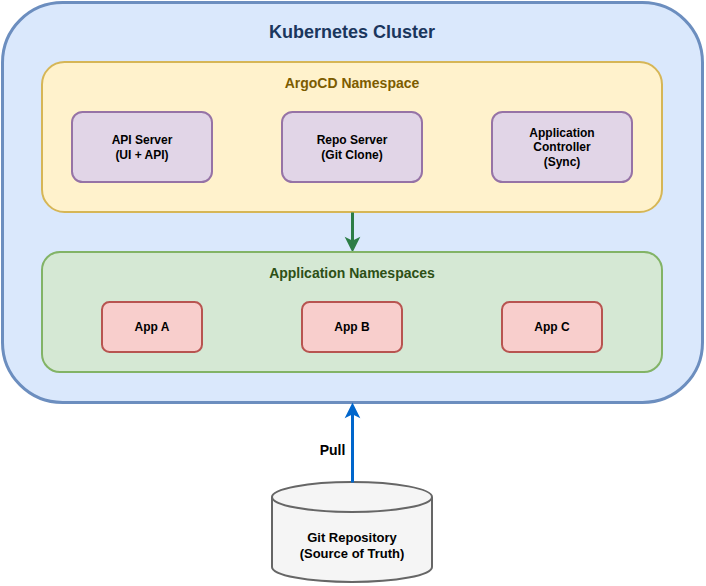
Componenti Principali
| Componente | Funzione |
|---|---|
| API Server | Espone API REST e gRPC, serve la UI |
| Repository Server | Clona e cache dei repository Git |
| Application Controller | Monitora e sincronizza le applicazioni |
| Redis | Cache per lo stato delle applicazioni |
| Dex | Identity provider per SSO (opzionale) |
Installazione
Prerequisiti
- Kubernetes cluster (1.25+)
- kubectl configurato
- Helm 3 (opzionale ma consigliato)
Metodo 1: Manifest YAML (Semplice)
# Crea namespace
kubectl create namespace argocd

# Installa ArgoCD
kubectl apply -n argocd -f https://raw.githubusercontent.com/argoproj/argo-cd/stable/manifests/install.yaml

# Verifica pods
kubectl get pods -n argocd
Metodo 2: Helm (Consigliato per produzione)
# Aggiungi repo Helm
helm repo add argo https://argoproj.github.io/argo-helm
helm repo update

# Installa con valori custom
helm install argocd argo/argo-cd \
  --namespace argocd \
  --create-namespace \
  --values values.yaml
values.yaml esempio:
server:
  replicas: 2
  ingress:
    enabled: true
    ingressClassName: nginx
    hosts:
      - argocd.example.com
    tls:
      - secretName: argocd-tls
        hosts:
          - argocd.example.com

controller:
  replicas: 1
  resources:
    requests:
      cpu: 250m
      memory: 256Mi
    limits:
      cpu: 500m
      memory: 512Mi

repoServer:
  replicas: 2

redis:
  enabled: true

configs:
  params:
    server.insecure: false
  cm:
    url: https://argocd.example.com
Accesso Iniziale
# Password admin iniziale
kubectl -n argocd get secret argocd-initial-admin-secret \
  -o jsonpath="{.data.password}" | base64 -d

# Port forward per accesso locale
kubectl port-forward svc/argocd-server -n argocd 8080:443

# Accedi a https://localhost:8080
# Username: admin
# Password: (quella ottenuta sopra)
Installare CLI
# Linux
curl -sSL -o argocd https://github.com/argoproj/argo-cd/releases/latest/download/argocd-linux-amd64
chmod +x argocd
sudo mv argocd /usr/local/bin/

# macOS
brew install argocd

# Login CLI
argocd login localhost:8080
Concetti Fondamentali
Application
Una Application in ArgoCD definisce:
- Source: dove sono i manifest (Git repo)
- Destination: dove deployare (cluster + namespace)
- Sync policy: come sincronizzare
apiVersion: argoproj.io/v1alpha1
kind: Application
metadata:
  name: my-app
  namespace: argocd
spec:
  project: default
  source:
    repoURL: https://github.com/myorg/my-app.git
    targetRevision: main
    path: kubernetes/
  destination:
    server: https://kubernetes.default.svc
    namespace: my-app
  syncPolicy:
    automated:
      prune: true
      selfHeal: true
    syncOptions:
      - CreateNamespace=true
Project
Un AppProject raggruppa applicazioni con policy comuni:
apiVersion: argoproj.io/v1alpha1
kind: AppProject
metadata:
  name: production
  namespace: argocd
spec:
  description: Production applications
  sourceRepos:
    - https://github.com/myorg/*
  destinations:
    - namespace: '*'
      server: https://kubernetes.default.svc
  clusterResourceWhitelist:
    - group: ''
      kind: Namespace
  roles:
    - name: developer
      policies:
        - p, proj:production:developer, applications, get, production/*, allow
        - p, proj:production:developer, applications, sync, production/*, allow
Repository
Registra repository Git privati:
# Via CLI
argocd repo add https://github.com/myorg/private-repo.git \
  --username git \
  --password $GITHUB_TOKEN
Sync Policies e Strategie
Auto Sync
syncPolicy:
  automated:
    prune: true       # Elimina risorse non in Git
    selfHeal: true    # Correggi modifiche manuali
    allowEmpty: false # Non sync se repo vuoto
Sync Options
syncOptions:
  - Validate=true              # Valida manifest prima di sync
  - CreateNamespace=true       # Crea namespace se non esiste
  - PrunePropagationPolicy=foreground  # Attendi eliminazione
  - PruneLast=true             # Prune dopo apply
  - ApplyOutOfSyncOnly=true    # Apply solo risorse OutOfSync
  - ServerSideApply=true       # Usa server-side apply
Sync Waves e Hooks
Controlla l'ordine di deployment:
apiVersion: apps/v1
kind: Deployment
metadata:
  name: database
  annotations:
    argocd.argoproj.io/sync-wave: "-1"  # Prima
---
apiVersion: apps/v1
kind: Deployment
metadata:
  name: backend
  annotations:
    argocd.argoproj.io/sync-wave: "0"   # Dopo database
---
apiVersion: apps/v1
kind: Deployment
metadata:
  name: frontend
  annotations:
    argocd.argoproj.io/sync-wave: "1"   # Dopo backend
Resource Hooks
apiVersion: batch/v1
kind: Job
metadata:
  name: db-migration
  annotations:
    argocd.argoproj.io/hook: PreSync
    argocd.argoproj.io/hook-delete-policy: HookSucceeded
spec:
  template:
    spec:
      containers:
        - name: migrate
          image: myorg/migrations:latest
          command: ["./migrate.sh"]
      restartPolicy: Never
Hook types:
PreSync: Prima della sincronizzazioneSync: Durante la sincronizzazionePostSync: Dopo la sincronizzazioneSyncFail: Se sync fallisce
Integrazione con Helm
ArgoCD supporta nativamente Helm charts:
apiVersion: argoproj.io/v1alpha1
kind: Application
metadata:
  name: nginx-ingress
spec:
  source:
    repoURL: https://kubernetes.github.io/ingress-nginx
    chart: ingress-nginx
    targetRevision: 4.8.3
    helm:
      releaseName: nginx-ingress
      values: |
        controller:
          replicaCount: 2
          service:
            type: LoadBalancer
          metrics:
            enabled: true
  destination:
    server: https://kubernetes.default.svc
    namespace: ingress-nginx
App of Apps Pattern
Gestisci tutte le applicazioni con una singola Application:
apiVersion: argoproj.io/v1alpha1
kind: Application
metadata:
  name: root-app
  namespace: argocd
spec:
  project: default
  source:
    repoURL: https://github.com/myorg/argocd-apps.git
    path: apps
    targetRevision: main
  destination:
    server: https://kubernetes.default.svc
    namespace: argocd
  syncPolicy:
    automated:
      prune: true
      selfHeal: true
Notifications
Configura notifiche per eventi:
# ConfigMap per notifiche
apiVersion: v1
kind: ConfigMap
metadata:
  name: argocd-notifications-cm
data:
  service.slack: |
    token: $slack-token
  template.app-sync-succeeded: |
    message: |
      Application {{.app.metadata.name}} sync succeeded.
      Revision: {{.app.status.sync.revision}}
  trigger.on-sync-succeeded: |
    - when: app.status.sync.status == 'Synced'
      send: [app-sync-succeeded]
Best Practices Produzione
Sicurezza
# RBAC granulare
apiVersion: v1
kind: ConfigMap
metadata:
  name: argocd-rbac-cm
  namespace: argocd
data:
  policy.csv: |
    p, role:developer, applications, get, */*, allow
    p, role:developer, applications, sync, */*, allow
    p, role:admin, applications, *, */*, allow
    g, developers, role:developer
    g, admins, role:admin
  policy.default: role:readonly
High Availability
# values.yaml per HA
controller:
  replicas: 2
  env:
    - name: ARGOCD_CONTROLLER_REPLICAS
      value: "2"

server:
  replicas: 3
  autoscaling:
    enabled: true
    minReplicas: 3
    maxReplicas: 5

repoServer:
  replicas: 3
  autoscaling:
    enabled: true

redis-ha:
  enabled: true
Troubleshooting
Comandi Utili
# Stato applicazione
argocd app get my-app

# Log sync
argocd app logs my-app

# Force sync
argocd app sync my-app --force

# Diff
argocd app diff my-app

# History
argocd app history my-app

# Rollback
argocd app rollback my-app <revision>
Problemi Comuni
App bloccata in "Progressing":
# Verifica risorse
kubectl get all -n my-app-namespace

# Eventi
kubectl get events -n my-app-namespace --sort-by='.lastTimestamp'
Sync fallito:
# Dettagli errore
argocd app get my-app --show-operation

# Rimuovi risorse orfane
argocd app sync my-app --prune
Conclusioni
ArgoCD e lo strumento essenziale per implementare GitOps su Kubernetes. Vantaggi chiave:
- Git come fonte di verita: audit trail completo
- Riconciliazione automatica: il cluster si auto-corregge
- UI intuitiva: visibilita immediata sullo stato
- Ecosistema maturo: integrazioni, plugin, community attiva
Checklist implementazione:
- Installa ArgoCD con Helm
- Configura SSO/RBAC
- Struttura repository GitOps
- Implementa App of Apps pattern
- Configura notifiche
- Testa rollback
- Documenta workflow team