ArgoCD: GitOps for Kubernetes - Complete Guide 2026
ArgoCD has become the de facto standard for implementing GitOps on Kubernetes. With over 15,000 stars on GitHub and adoption by companies like Intuit, Red Hat, and Tesla, ArgoCD represents the most mature solution for declarative continuous deployment. In this guide, we'll see how to install, configure, and use ArgoCD to automate deployments of your Kubernetes applications.
What is GitOps
Before diving into ArgoCD, let's understand the GitOps paradigm.
GitOps Principles
- Declarative: The entire system is described declaratively
- Versioned: The desired state is versioned in Git
- Automatic: Approved changes are applied automatically
- Continuous Reconciliation: The system automatically corrects drift
GitOps vs Traditional CI/CD
Traditional CI/CD (Push-based):
Developer -> Git -> CI Pipeline -> kubectl apply -> ClusterProblems:
- CI has access to the cluster (security concern)
- No complete audit trail
- Difficult rollback
GitOps (Pull-based):
Developer -> Git <- ArgoCD (in cluster) -> ReconciliationAdvantages:
- The cluster "pulls" configurations
- Git is the single source of truth
- Complete audit trail
- Rollback = git revert
What is ArgoCD
ArgoCD is a Kubernetes controller that:
- Monitors Git repositories
- Compares desired state (Git) vs actual state (cluster)
- Automatically synchronizes differences
- Provides UI and CLI for management
Architecture
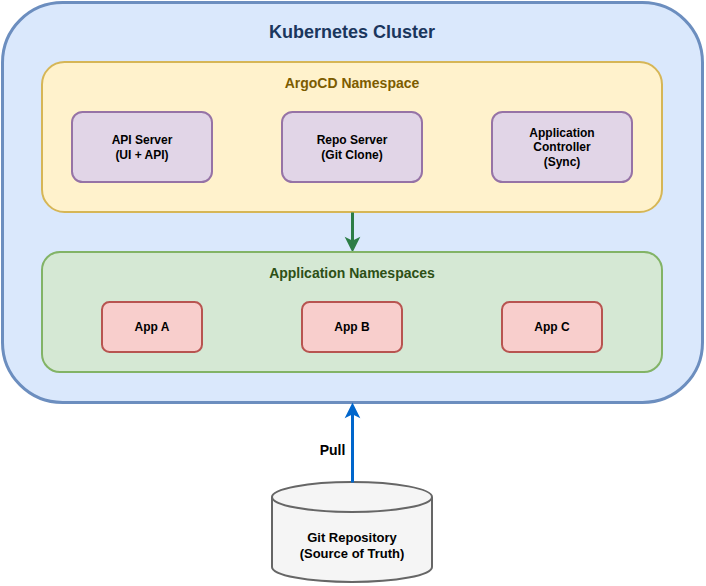
Main Components
| Component | Function |
|---|---|
| API Server | Exposes REST and gRPC API, serves the UI |
| Repository Server | Clones and caches Git repositories |
| Application Controller | Monitors and synchronizes applications |
| Redis | Cache for application state |
| Dex | Identity provider for SSO (optional) |
Installation
Prerequisites
- Kubernetes cluster (1.25+)
- kubectl configured
- Helm 3 (optional but recommended)
Method 1: YAML Manifest (Simple)
# Create namespace
kubectl create namespace argocd

# Install ArgoCD
kubectl apply -n argocd -f https://raw.githubusercontent.com/argoproj/argo-cd/stable/manifests/install.yaml

# Verify pods
kubectl get pods -n argocd
Method 2: Helm (Recommended for production)
# Add Helm repo
helm repo add argo https://argoproj.github.io/argo-helm
helm repo update

# Install with custom values
helm install argocd argo/argo-cd \
  --namespace argocd \
  --create-namespace \
  --values values.yaml
values.yaml example:
server:
  replicas: 2
  ingress:
    enabled: true
    ingressClassName: nginx
    hosts:
      - argocd.example.com
    tls:
      - secretName: argocd-tls
        hosts:
          - argocd.example.com

controller:
  replicas: 1
  resources:
    requests:
      cpu: 250m
      memory: 256Mi
    limits:
      cpu: 500m
      memory: 512Mi

repoServer:
  replicas: 2

redis:
  enabled: true

configs:
  params:
    server.insecure: false
  cm:
    url: https://argocd.example.com
Initial Access
# Get initial admin password
kubectl -n argocd get secret argocd-initial-admin-secret \
  -o jsonpath="{.data.password}" | base64 -d

# Port forward for local access
kubectl port-forward svc/argocd-server -n argocd 8080:443

# Access https://localhost:8080
# Username: admin
# Password: (the one obtained above)
Install CLI
# Linux
curl -sSL -o argocd https://github.com/argoproj/argo-cd/releases/latest/download/argocd-linux-amd64
chmod +x argocd
sudo mv argocd /usr/local/bin/

# macOS
brew install argocd

# CLI Login
argocd login localhost:8080
Fundamental Concepts
Application
An Application in ArgoCD defines:
- Source: where manifests are located (Git repo)
- Destination: where to deploy (cluster + namespace)
- Sync policy: how to synchronize
apiVersion: argoproj.io/v1alpha1
kind: Application
metadata:
  name: my-app
  namespace: argocd
spec:
  project: default
  source:
    repoURL: https://github.com/myorg/my-app.git
    targetRevision: main
    path: kubernetes/
  destination:
    server: https://kubernetes.default.svc
    namespace: my-app
  syncPolicy:
    automated:
      prune: true
      selfHeal: true
    syncOptions:
      - CreateNamespace=true
Project
An AppProject groups applications with common policies:
apiVersion: argoproj.io/v1alpha1
kind: AppProject
metadata:
  name: production
  namespace: argocd
spec:
  description: Production applications
  sourceRepos:
    - https://github.com/myorg/*
  destinations:
    - namespace: '*'
      server: https://kubernetes.default.svc
  clusterResourceWhitelist:
    - group: ''
      kind: Namespace
  roles:
    - name: developer
      policies:
        - p, proj:production:developer, applications, get, production/*, allow
        - p, proj:production:developer, applications, sync, production/*, allow
Repository
Register private Git repositories:
# Via CLI
argocd repo add https://github.com/myorg/private-repo.git \
  --username git \
  --password $GITHUB_TOKEN
Sync Policies and Strategies
Auto Sync
syncPolicy:
  automated:
    prune: true       # Delete resources not in Git
    selfHeal: true    # Correct manual changes
    allowEmpty: false # Don't sync if repo is empty
Sync Options
syncOptions:
  - Validate=true              # Validate manifests before sync
  - CreateNamespace=true       # Create namespace if it doesn't exist
  - PrunePropagationPolicy=foreground  # Wait for deletion
  - PruneLast=true             # Prune after apply
  - ApplyOutOfSyncOnly=true    # Apply only OutOfSync resources
  - ServerSideApply=true       # Use server-side apply
Sync Waves and Hooks
Control deployment order:
apiVersion: apps/v1
kind: Deployment
metadata:
  name: database
  annotations:
    argocd.argoproj.io/sync-wave: "-1"  # First
---
apiVersion: apps/v1
kind: Deployment
metadata:
  name: backend
  annotations:
    argocd.argoproj.io/sync-wave: "0"   # After database
---
apiVersion: apps/v1
kind: Deployment
metadata:
  name: frontend
  annotations:
    argocd.argoproj.io/sync-wave: "1"   # After backend
Resource Hooks
apiVersion: batch/v1
kind: Job
metadata:
  name: db-migration
  annotations:
    argocd.argoproj.io/hook: PreSync
    argocd.argoproj.io/hook-delete-policy: HookSucceeded
spec:
  template:
    spec:
      containers:
        - name: migrate
          image: myorg/migrations:latest
          command: ["./migrate.sh"]
      restartPolicy: Never
Hook types:
PreSync: Before synchronizationSync: During synchronizationPostSync: After synchronizationSyncFail: If sync fails
Helm Integration
ArgoCD natively supports Helm charts:
apiVersion: argoproj.io/v1alpha1
kind: Application
metadata:
  name: nginx-ingress
spec:
  source:
    repoURL: https://kubernetes.github.io/ingress-nginx
    chart: ingress-nginx
    targetRevision: 4.8.3
    helm:
      releaseName: nginx-ingress
      values: |
        controller:
          replicaCount: 2
          service:
            type: LoadBalancer
          metrics:
            enabled: true
  destination:
    server: https://kubernetes.default.svc
    namespace: ingress-nginx
App of Apps Pattern
Manage all applications with a single Application:
apiVersion: argoproj.io/v1alpha1
kind: Application
metadata:
  name: root-app
  namespace: argocd
spec:
  project: default
  source:
    repoURL: https://github.com/myorg/argocd-apps.git
    path: apps
    targetRevision: main
  destination:
    server: https://kubernetes.default.svc
    namespace: argocd
  syncPolicy:
    automated:
      prune: true
      selfHeal: true
Notifications
Configure notifications for events:
# ConfigMap for notifications
apiVersion: v1
kind: ConfigMap
metadata:
  name: argocd-notifications-cm
data:
  service.slack: |
    token: $slack-token
  template.app-sync-succeeded: |
    message: |
      Application {{.app.metadata.name}} sync succeeded.
      Revision: {{.app.status.sync.revision}}
  trigger.on-sync-succeeded: |
    - when: app.status.sync.status == 'Synced'
      send: [app-sync-succeeded]
Production Best Practices
Security
# Granular RBAC
apiVersion: v1
kind: ConfigMap
metadata:
  name: argocd-rbac-cm
  namespace: argocd
data:
  policy.csv: |
    p, role:developer, applications, get, */*, allow
    p, role:developer, applications, sync, */*, allow
    p, role:admin, applications, *, */*, allow
    g, developers, role:developer
    g, admins, role:admin
  policy.default: role:readonly
High Availability
# values.yaml for HA
controller:
  replicas: 2
  env:
    - name: ARGOCD_CONTROLLER_REPLICAS
      value: "2"

server:
  replicas: 3
  autoscaling:
    enabled: true
    minReplicas: 3
    maxReplicas: 5

repoServer:
  replicas: 3
  autoscaling:
    enabled: true

redis-ha:
  enabled: true
Troubleshooting
Useful Commands
# Application status
argocd app get my-app

# Sync logs
argocd app logs my-app

# Force sync
argocd app sync my-app --force

# Diff
argocd app diff my-app

# History
argocd app history my-app

# Rollback
argocd app rollback my-app <revision>
Common Problems
App stuck in "Progressing":
# Check resources
kubectl get all -n my-app-namespace

# Events
kubectl get events -n my-app-namespace --sort-by='.lastTimestamp'
Sync failed:
# Error details
argocd app get my-app --show-operation

# Remove orphan resources
argocd app sync my-app --prune
Conclusions
ArgoCD is the essential tool for implementing GitOps on Kubernetes. Key advantages:
- Git as source of truth: complete audit trail
- Automatic reconciliation: the cluster self-corrects
- Intuitive UI: immediate visibility on state
- Mature ecosystem: integrations, plugins, active community
Implementation checklist:
- Install ArgoCD with Helm
- Configure SSO/RBAC
- Structure GitOps repository
- Implement App of Apps pattern
- Configure notifications
- Test rollback
- Document team workflow