Longhorn: Distributed Storage for Kubernetes - Complete Guide
Storage is one of the most complex problems in Kubernetes. Containers are ephemeral, but data must persist. Longhorn, a CNCF graduated project, solves this problem by offering distributed, resilient, and easy-to-manage storage. In this guide, we'll see how to install and configure Longhorn for your Kubernetes cluster.
The Storage Problem in Kubernetes
Ephemeral Storage
By default, Pod storage is ephemeral:
apiVersion: v1
kind: Pod
metadata:
  name: my-app
spec:
  containers:
    - name: app
      image: my-app:latest
      # Everything in /data is lost on restart!
Traditional Solutions
| Solution | Pros | Cons |
|---|---|---|
| hostPath | Simple | No portability, no HA |
| NFS | Shared | Single point of failure |
| Cloud Provider | Managed | Vendor lock-in, costs |
| Ceph | Powerful | High complexity |
| Longhorn | Simple + Distributed | Requires resources |
What is Longhorn
Longhorn is a distributed block storage system for Kubernetes that:
- Uses local node disks
- Replicates data across multiple nodes
- Manages snapshots and backups
- Provides integrated web UI
- Supports DR and migration
Architecture
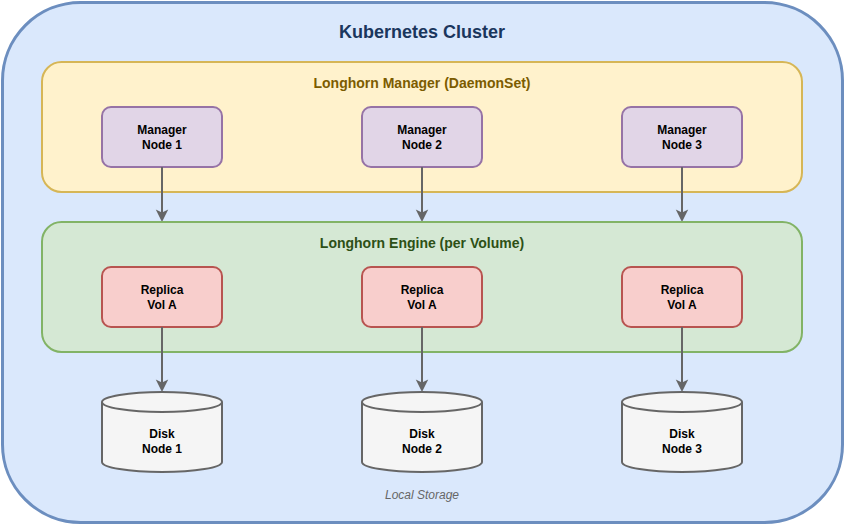
Main Components
| Component | Function |
|---|---|
| Longhorn Manager | Orchestration, API, UI |
| Longhorn Engine | iSCSI target, manages replicas |
| Replica | Data copy on local disk |
| CSI Driver | Kubernetes integration |
Requirements
Hardware
| Resource | Minimum | Recommended |
|---|---|---|
| Nodes | 3 | 3+ |
| CPU per node | 2 cores | 4+ cores |
| RAM per node | 4 GB | 8+ GB |
| Disk | SSD 50 GB | SSD/NVMe 200+ GB |
Software
Kubernetes: 1.25+
OS: Ubuntu 20.04+, RHEL 8+, SLES 15+
Filesystem: ext4, XFS
Node Prerequisites
# Each node must have open-iscsi
# Ubuntu/Debian
sudo apt install open-iscsi
sudo systemctl enable iscsid
sudo systemctl start iscsid

# RHEL/CentOS
sudo yum install iscsi-initiator-utils
sudo systemctl enable iscsid
sudo systemctl start iscsid
Installation
Method 1: Helm (Recommended)
# Add repo
helm repo add longhorn https://charts.longhorn.io
helm repo update

# Install
helm install longhorn longhorn/longhorn \
  --namespace longhorn-system \
  --create-namespace \
  --set defaultSettings.defaultDataPath="/var/lib/longhorn" \
  --set defaultSettings.defaultReplicaCount=3
Method 2: Kubectl
kubectl apply -f https://raw.githubusercontent.com/longhorn/longhorn/v1.6.0/deploy/longhorn.yamlVerify Installation
# Check pods
kubectl -n longhorn-system get pods

# Expected output
NAME                                        READY   STATUS    RESTARTS
longhorn-manager-xxxxx                      1/1     Running   0
longhorn-driver-deployer-xxxxx              1/1     Running   0
longhorn-ui-xxxxx                           1/1     Running   0
engine-image-ei-xxxxx                       1/1     Running   0
instance-manager-xxxxx                      1/1     Running   0
UI Access
# Port forward
kubectl -n longhorn-system port-forward svc/longhorn-frontend 8080:80

# Access http://localhost:8080
StorageClass Configuration
Default StorageClass
Longhorn automatically creates a StorageClass:
kubectl get storageclass
# NAME                 PROVISIONER          RECLAIMPOLICY
# longhorn (default)   driver.longhorn.io   Delete
Custom StorageClass
apiVersion: storage.k8s.io/v1
kind: StorageClass
metadata:
  name: longhorn-ssd
provisioner: driver.longhorn.io
allowVolumeExpansion: true
reclaimPolicy: Retain
volumeBindingMode: Immediate
parameters:
  numberOfReplicas: "3"
  staleReplicaTimeout: "2880"
  fromBackup: ""
  fsType: "ext4"
  dataLocality: "best-effort"
Important Parameters
| Parameter | Description | Default |
|---|---|---|
numberOfReplicas | Number of replicas | 3 |
dataLocality | Data locality (disabled, best-effort, strict-local) | disabled |
diskSelector | Select specific disks | - |
nodeSelector | Select specific nodes | - |
Creating and Using Volumes
PersistentVolumeClaim
apiVersion: v1
kind: PersistentVolumeClaim
metadata:
  name: my-data
spec:
  accessModes:
    - ReadWriteOnce
  storageClassName: longhorn
  resources:
    requests:
      storage: 10Gi
Using the Volume in a Pod
apiVersion: v1
kind: Pod
metadata:
  name: my-app
spec:
  containers:
    - name: app
      image: my-app:latest
      volumeMounts:
        - name: data
          mountPath: /data
  volumes:
    - name: data
      persistentVolumeClaim:
        claimName: my-data
StatefulSet with Longhorn
apiVersion: apps/v1
kind: StatefulSet
metadata:
  name: postgres
spec:
  serviceName: postgres
  replicas: 1
  selector:
    matchLabels:
      app: postgres
  template:
    metadata:
      labels:
        app: postgres
    spec:
      containers:
        - name: postgres
          image: postgres:15
          env:
            - name: POSTGRES_PASSWORD
              value: "password"
            - name: PGDATA
              value: /var/lib/postgresql/data/pgdata
          volumeMounts:
            - name: data
              mountPath: /var/lib/postgresql/data
  volumeClaimTemplates:
    - metadata:
        name: data
      spec:
        accessModes: ["ReadWriteOnce"]
        storageClassName: longhorn
        resources:
          requests:
            storage: 20Gi
Backup and Disaster Recovery
Configure Backup Target
Longhorn supports backup to S3 or NFS.
S3 Backup:
# Secret for S3 credentials
apiVersion: v1
kind: Secret
metadata:
  name: s3-secret
  namespace: longhorn-system
type: Opaque
stringData:
  AWS_ACCESS_KEY_ID: "your-access-key"
  AWS_SECRET_ACCESS_KEY: "your-secret-key"
# Configure via UI or CLI
# Settings > Backup Target
# s3://bucket-name@region/pathNFS Backup:
nfs://server-ip:/path/to/backupCreate Manual Backup
apiVersion: longhorn.io/v1beta2
kind: Backup
metadata:
  name: my-data-backup
  namespace: longhorn-system
spec:
  snapshotName: my-data-snapshot
  labels:
    app: my-app
    type: manual
Recurring Backups
apiVersion: longhorn.io/v1beta2
kind: RecurringJob
metadata:
  name: daily-backup
  namespace: longhorn-system
spec:
  cron: "0 2 * * *"  # Every day at 2:00 AM
  task: backup
  retain: 7
  concurrency: 1
  groups:
    - default
Restore from Backup
1. Via UI: Volumes > Create Volume > From Backup
2. Via PVC:
apiVersion: v1
kind: PersistentVolumeClaim
metadata:
  name: restored-data
spec:
  accessModes:
    - ReadWriteOnce
  storageClassName: longhorn
  resources:
    requests:
      storage: 10Gi
  dataSource:
    name: my-data-backup
    kind: Backup
    apiGroup: longhorn.io
Snapshots
Create Snapshot
apiVersion: longhorn.io/v1beta2
kind: Snapshot
metadata:
  name: my-data-snap-1
  namespace: longhorn-system
spec:
  volume: my-data
  labels:
    app: my-app
Recurring Snapshots
apiVersion: longhorn.io/v1beta2
kind: RecurringJob
metadata:
  name: hourly-snapshot
  namespace: longhorn-system
spec:
  cron: "0 * * * *"  # Every hour
  task: snapshot
  retain: 24  # Keep last 24
  concurrency: 2
  groups:
    - default
Monitoring
Prometheus Metrics
Longhorn exposes Prometheus metrics:
# ServiceMonitor for Prometheus Operator
apiVersion: monitoring.coreos.com/v1
kind: ServiceMonitor
metadata:
  name: longhorn
  namespace: longhorn-system
spec:
  selector:
    matchLabels:
      app: longhorn-manager
  endpoints:
    - port: manager
Main Metrics
| Metric | Description |
|---|---|
longhorn_volume_actual_size_bytes | Actual volume size |
longhorn_volume_capacity_bytes | Volume capacity |
longhorn_volume_state | Volume state |
longhorn_node_storage_capacity_bytes | Node storage capacity |
longhorn_node_storage_usage_bytes | Node storage usage |
Grafana Dashboard
Import dashboard ID: 13032 (Longhorn Dashboard)
Production Best Practices
Replica Count
# Minimum 3 replicas for HA
parameters:
  numberOfReplicas: "3"
Node Scheduling
Ensure replicas are distributed:
# Settings > Replica Node Level Soft Anti-Affinity: true
# Settings > Replica Zone Level Soft Anti-Affinity: true
Disk Scheduling
# Add tags to disks
kubectl -n longhorn-system label nodes node1 storage=ssd
parameters:
diskSelector: "ssd"Backup Policy
# Daily backup with 7-day retention
apiVersion: longhorn.io/v1beta2
kind: RecurringJob
metadata:
  name: daily-backup
spec:
  cron: "0 3 * * *"
  task: backup
  retain: 7
Troubleshooting
Volume Degraded
# Check volume status
kubectl -n longhorn-system get volumes.longhorn.io

# Details
kubectl -n longhorn-system describe volume my-volume
Common causes:
- Node down
- Disk full
- Corrupted replica
Slow Replica Rebuild
# Increase concurrent rebuild
# Settings > Concurrent Replica Rebuild Per Node Limit: 5
Insufficient Space
# Check space per node
kubectl -n longhorn-system get nodes.longhorn.io -o wide
Solutions:
- Add disks
- Delete old snapshots
- Temporarily reduce replica count
Comparison with Alternatives
| Feature | Longhorn | Rook-Ceph | OpenEBS | Portworx |
|---|---|---|---|---|
| Complexity | Low | High | Medium | Medium |
| Performance | Good | Excellent | Good | Excellent |
| Integrated UI | Yes | No | Yes | Yes |
| S3 Backup | Yes | Yes | Yes | Yes |
| License | Apache 2.0 | Apache 2.0 | Apache 2.0 | Commercial |
| CNCF | Graduated | Graduated | Sandbox | No |
When to choose Longhorn:
- Small to medium clusters
- Teams with limited Kubernetes experience
- Need for quick setup
- Limited budget
Conclusions
Longhorn is the ideal solution for those looking for distributed storage on Kubernetes without the complexity of Ceph or the costs of enterprise solutions.
Implementation checklist:
- Node prerequisites (open-iscsi)
- Installation via Helm
- StorageClass configuration
- Backup target setup (S3/NFS)
- Recurring backup configured
- Active monitoring
- Restore testing